Blog
A Team of AI Agents Runs Our Office Signage. I Stay in the Loop by Choice.
A personal account from Wallboard’s CEO of an experiment in letting AI agents run our own office screens.
In short: Wallboard is a digital signage platform for managing content on screens at scale. In this experiment, Wallboard’s CEO used Claude, connected through the Wallboard MCP connector, to have AI agents design, build and run the company’s internal communications screens. Every weekday morning the agents pull fresh content from Notion, HubSpot, Fireflies and Microsoft Teams. A person approves new stories from a phone in about two minutes.
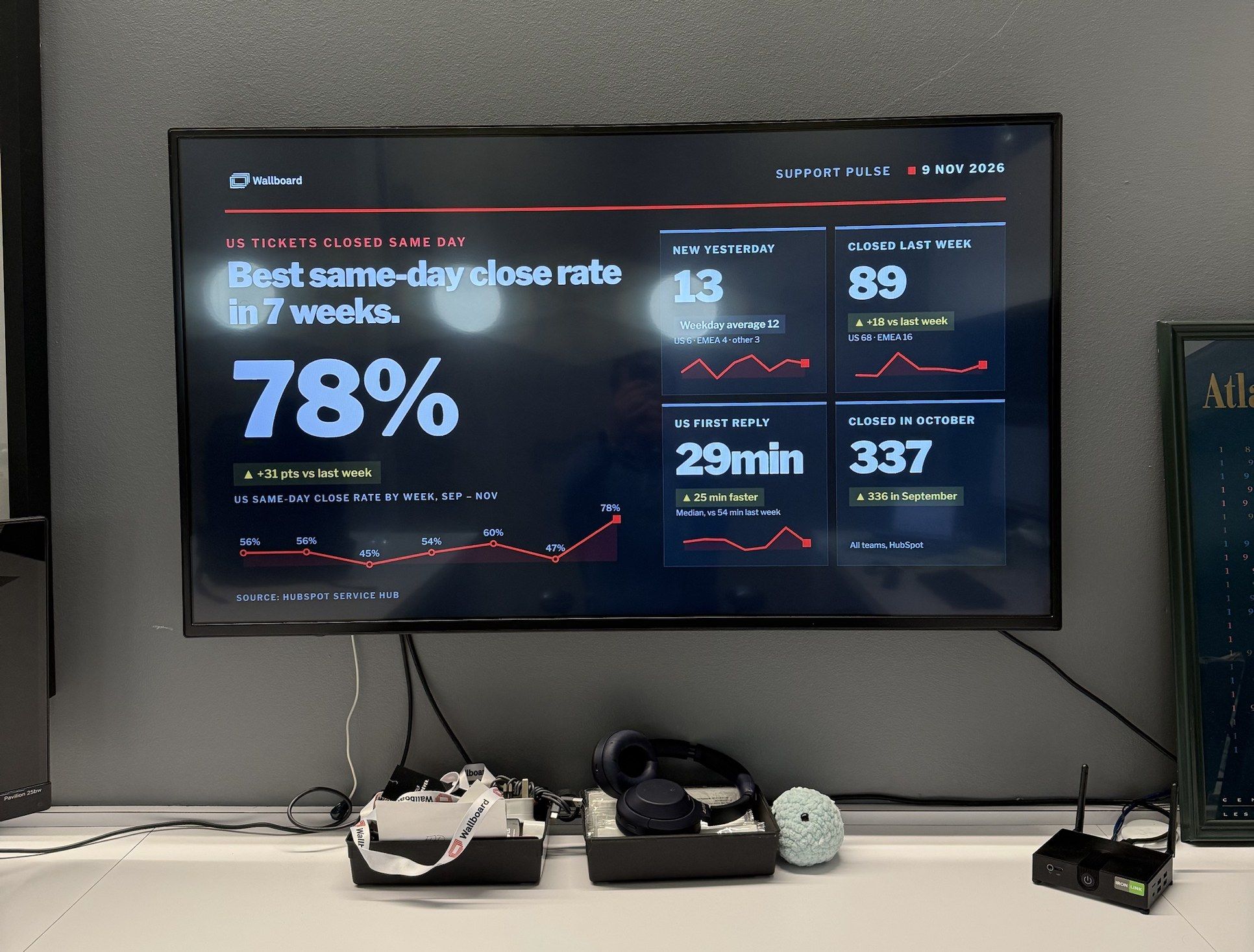
I’m not a designer. I’m not a power user of our own CMS, either. Over nine days I logged into the Wallboard portal a handful of times. Our office screen now updates itself every morning with live numbers, customer wins, product releases and quotes from real calls.
The question I set out to answer was simple: could one person build a self-sustaining signage network without help from the rest of the team? I didn’t ask support, engineering or marketing for anything. When something broke, and plenty did, the agents diagnosed it and fixed it themselves.
My part takes about two minutes: I read one message on my phone and reply "approve." This is the story of how we got there, including everything that broke along the way.
Why I started
For years I’ve wanted Wallboard to have its own internal communications channel: well designed, on brand, and kept fresh with what’s actually happening across the company. We sell digital signage. Our own office screens should be the best advertisement we have.
It never happened, and not because anyone said no. Building something like that takes people who really know the platform, and those people are busy doing customer work. Every time, the customer won, as it should.
I had a second frustration. Everyone talks about AI, but we’ve struggled to say clearly what it really means for a signage network. I don’t mean a tool that writes a headline. I mean agents that build and run a network while people spend far less time on it. I couldn’t explain that well, so I decided to try it myself and write down everything that happened.
So on a Friday afternoon I asked Claude, connected to our platform through the Wallboard MCP connector, to build a few slides from our Notion "Company Intelligence" report: KPIs, wins and company news, on brand and animated.
Attempt one: four beautiful slides and a black screen
Within an hour I had four animated slides: network growth, sales momentum, engineering velocity and customer wins. Numbers counted up, a red glow breathed in the background, and a timer bar crept across the bottom. Claude rendered them as videos and put them in a new playlist on the office player.
The screen stayed black.
We spent the next half hour troubleshooting. Everything looked perfect in our software’s preview, but the actual screen showed the first slide and then repeated it forever. It’s the classic gap between a content system and the hardware it runs on. Every signage platform and its customers run into it, especially during setup. At one point I saved the playlist in the editor while Claude was changing it, which quietly undid its fix. We ended the day with no picture. We never pinned down the exact cause, but it was specific to that player and that setup, not a general problem with video playlists, and the approach we switched to made it irrelevant.
The pivot
The next morning I realized the black screen wasn’t the real problem. Designing slides from scratch and rendering video every day was never going to last, however good they looked.
So I described what I actually wanted:
- an internal channel generated entirely from our own systems: Notion, HubSpot, Fireflies and Teams,
- managed every day by AI through the MCP,
- using the platform’s own building blocks.
The slides had to be glanceable, fresh and on-message. Then I said: "Don’t build anything yet."
Claude came back with a plan that flipped the approach. Build the design once, as custom apps: small programs that take a table of data and turn it into a designed, animated slide. After that, the AI only changes the data. Its rule was "the agent writes the facts," and every fact carries a live flag, so nothing reaches the screen until it’s approved.
A colleague put it more simply: content plus context. The content is the approved design, built once as a custom app. The context is the data that changes every day. As AI takes on more of the work of running signage networks, I think most of them will work this way.
The part that made it possible
None of this would have happened without the Wallboard MCP connector. It’s what lets an AI like Claude work inside our platform, and it brings our documentation along with it.
Before building anything, Claude read the connector’s guides:
- the API how-tos and step-by-step workflows,
- the custom app guide,
- the template tag reference,
- the full product documentation, through the connector’s search.
From those it worked out what Wallboard can do, which building blocks fit which job, and where the limits were. The plan it came back with used features I didn’t know well myself.
That’s the real point of this story. A connector that can only push content to a screen would have stopped at slide one. Ours exposes the same building blocks our own engineers use, so the agents could design, build and run the whole thing. I didn’t need to be a Wallboard power user, because the connector made the AI one. Every slide, datasource, playlist change and screen check afterwards went through that same connection.
The full list of platform features the agents used is at the end, for anyone who wants the details.
What’s on the wall now
A week later the office screen runs a three-minute loop we call Company Pulse. Claude built three of those custom apps with Wallboard’s public app toolkit (opens in a new tab). My part of each one was uploading a ZIP and dragging the app onto a blank slide.
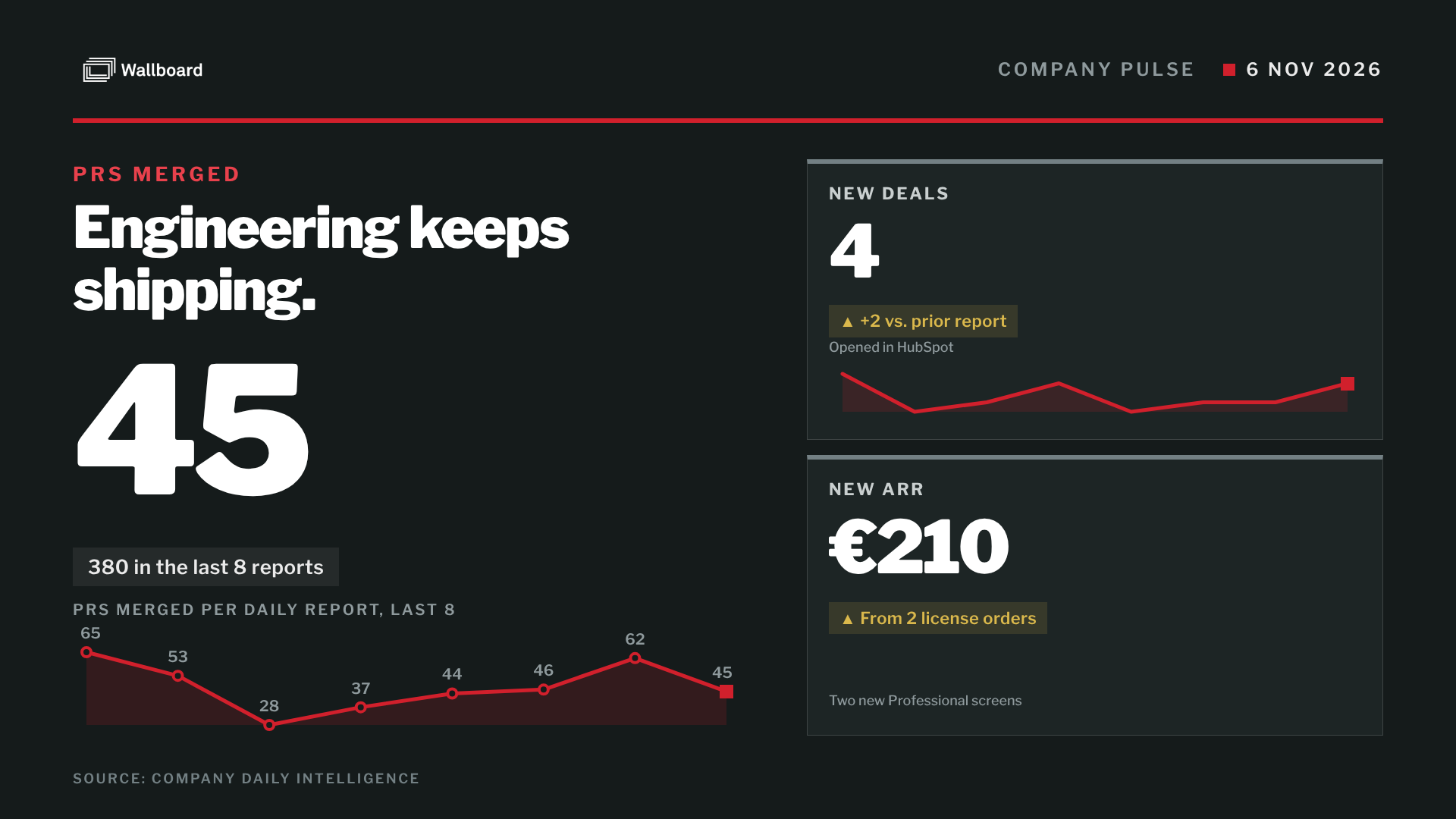
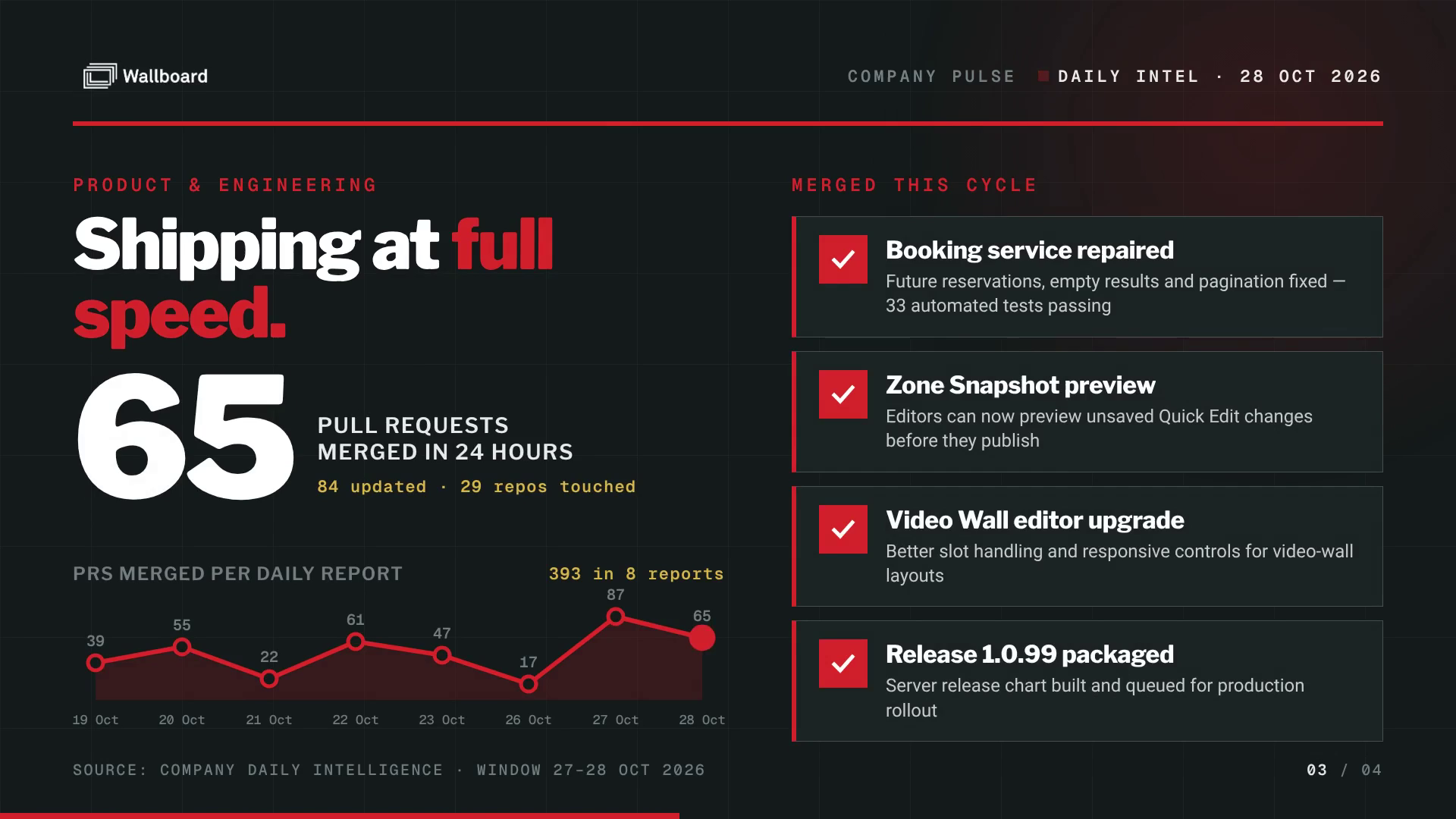
- KPI Board. One big number with a trend line and four tiles: players online, new deals, screens in use and code shipped. Every weekday it refreshes from our daily Notion report.
- Spotlight. One customer win per page, in big type, with up to three facts.
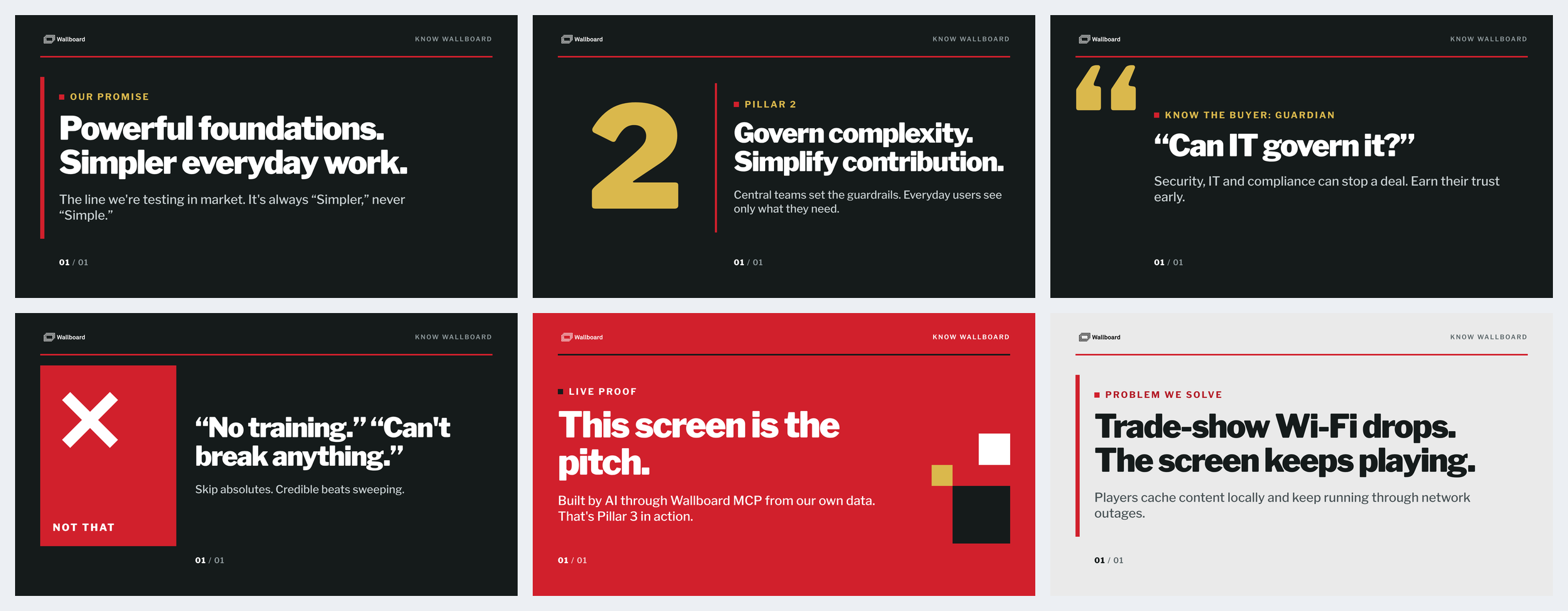
- Story Cards. Our brand promise, positioning, buyer questions, "say this, not that" language, quotes from calls and product releases. They rotate through six layouts so the deck never looks the same twice in a row.
- World Clock. An app I’d built earlier, shown in a different theme each loop.
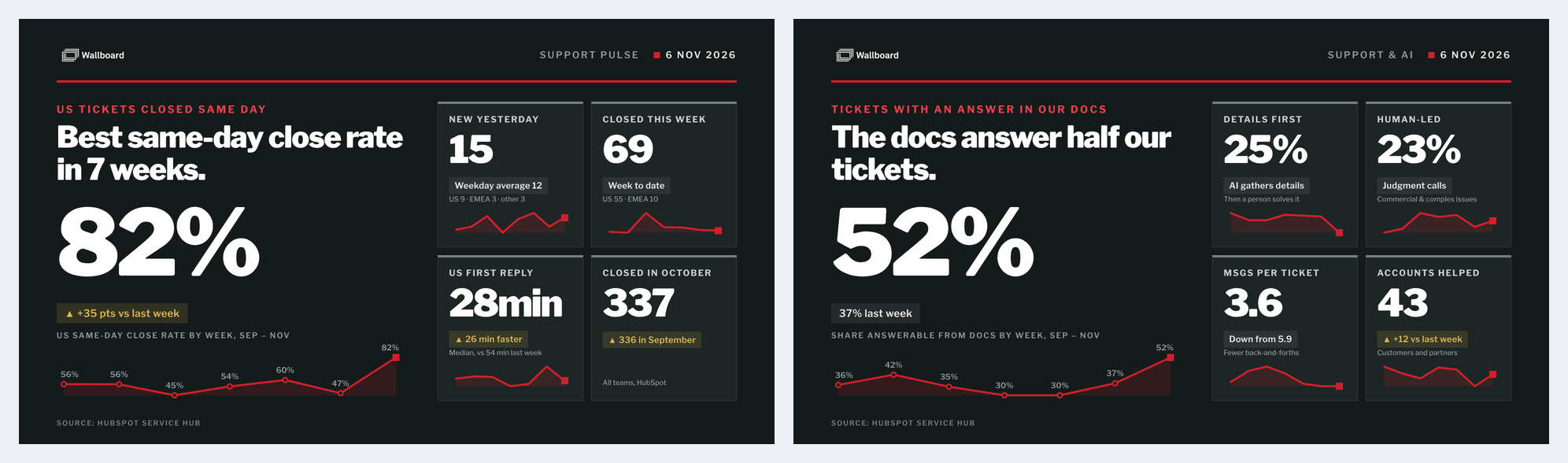
- Support Pulse. Same-day close rate, the week’s top support topics, and how often our docs already had the answer.
What broke
Plenty did. These four lessons were worth the trouble.
The screenshot lied. Three screenshots in a row showed the big number frozen partway through its count-up. We rewrote the animation twice. It turned out that an on-demand screenshot replays the slide from the start, so it always catches the count mid-way. The player’s own screenshot history showed the real screen, which had been fine all along.
Giving every item its turn on screen. A playlist page reloads its slide every time it comes around. An app that rotated through its own content always opened on item one. The fix was to let the clock pick the item, so each pass moves on to the next one.
Approval made the numbers stale. At first I approved every number each morning. I missed one approval and the KPI Board sat on Thursday’s numbers. Now the numbers publish themselves, with sanity checks: no negative changes on screen, and the board holds if the main number jumps more than 25%. Only words and stories wait for me. I expect that line to keep moving: if a person has to approve everything, the person becomes the bottleneck.
One layout gets boring fast. The first Story Card design looked great once and dull by the fifth loop. My note was "switch up the design to add more variety," and that produced the six layouts.
Here’s what matters most about this list: I didn’t solve any of it, and I never called anyone. I didn’t open a support ticket or ping an engineer, and nobody from the team got pulled in. The agents read the docs, tested a theory, checked the real screen, and either fixed the problem or found a better route around it. The video problem was never solved; it was simply made irrelevant. My job was to describe what I wanted and say yes or no.
How it feeds itself
Five AI agents run every weekday before 7 a.m. Each reads one kind of source and writes rows into the tables the apps display:
- Field notes reads every recorded customer and partner call from the day before. It quotes people word for word, keeps competitors anonymous and never puts a complaint about us on the wall.
- Support metrics turns HubSpot tickets into the support slides.
- KPIs and wins turns the daily Notion report into the KPI Board and drafts customer wins.
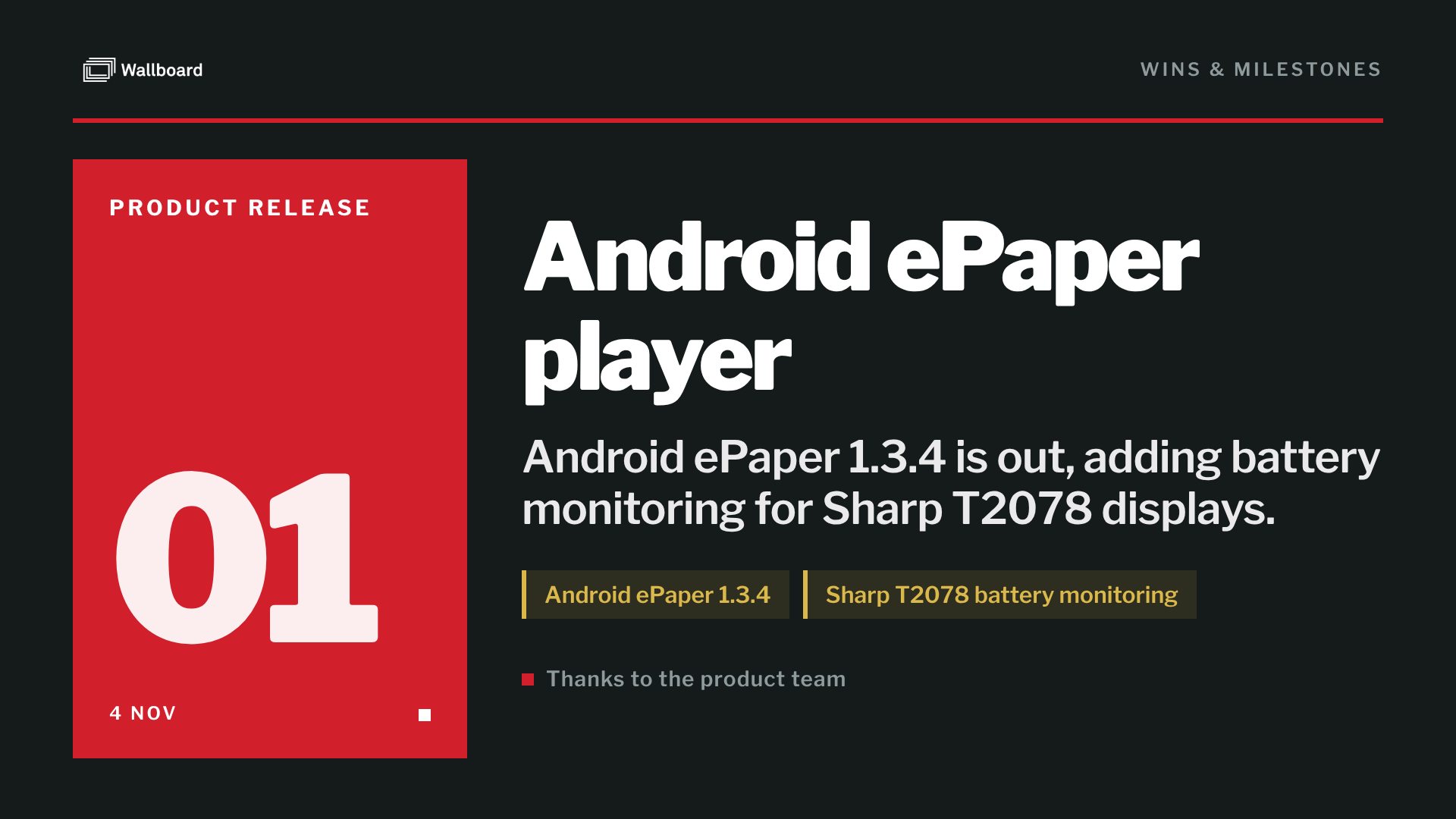
- Product releases turns our "What’s new?" announcements in Teams into "Just shipped" cards.
- Story refresh runs twice a week. It finds new angles on our messaging from Notion and the website.
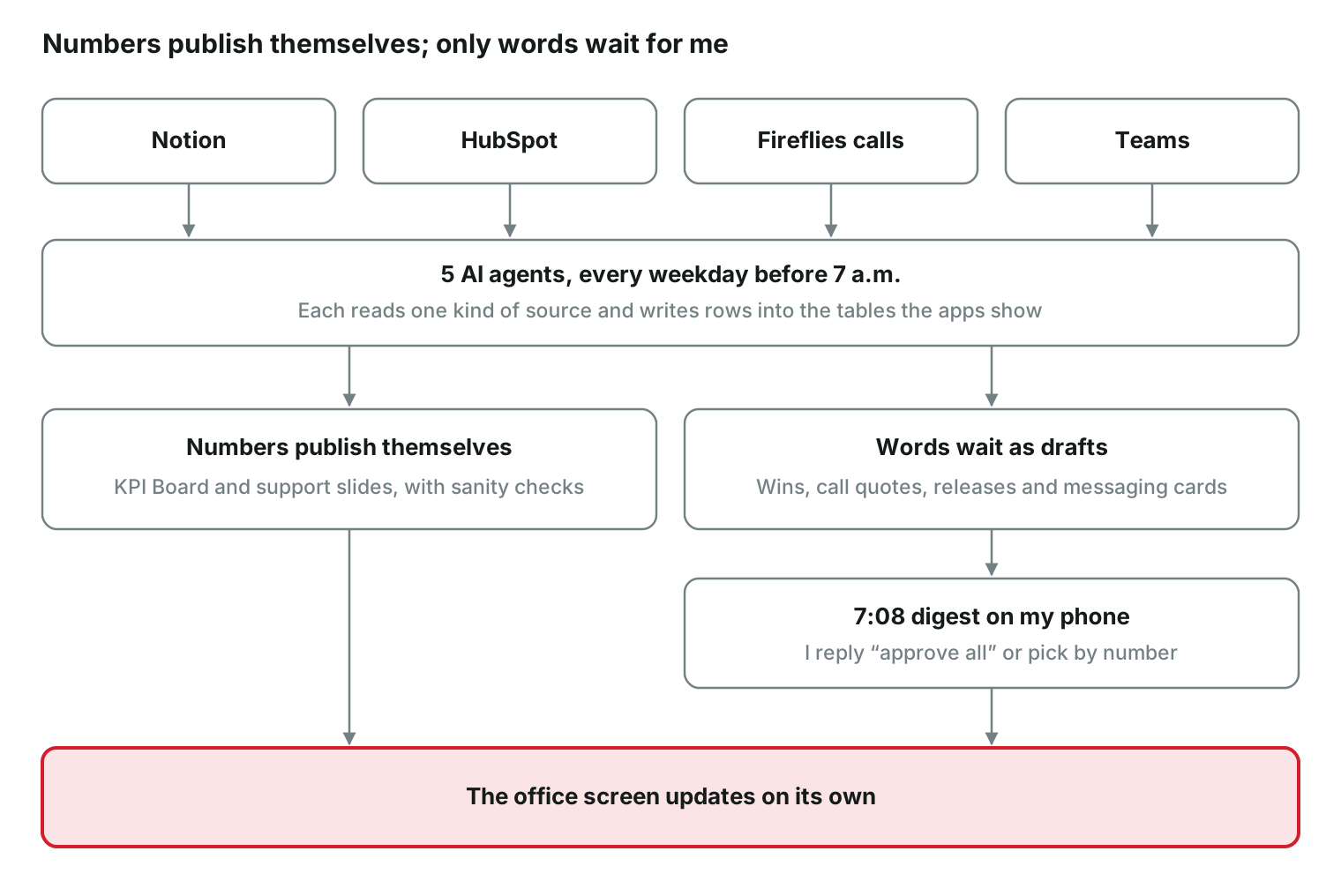
Adding a new source doesn’t mean building anything new. When I asked for product releases, nothing was designed or uploaded and nobody touched the portal. A new agent started writing cards into the Story Card table the next morning. Its first run even held back three releases, because Teams said they’d shipped while Notion said they hadn’t.
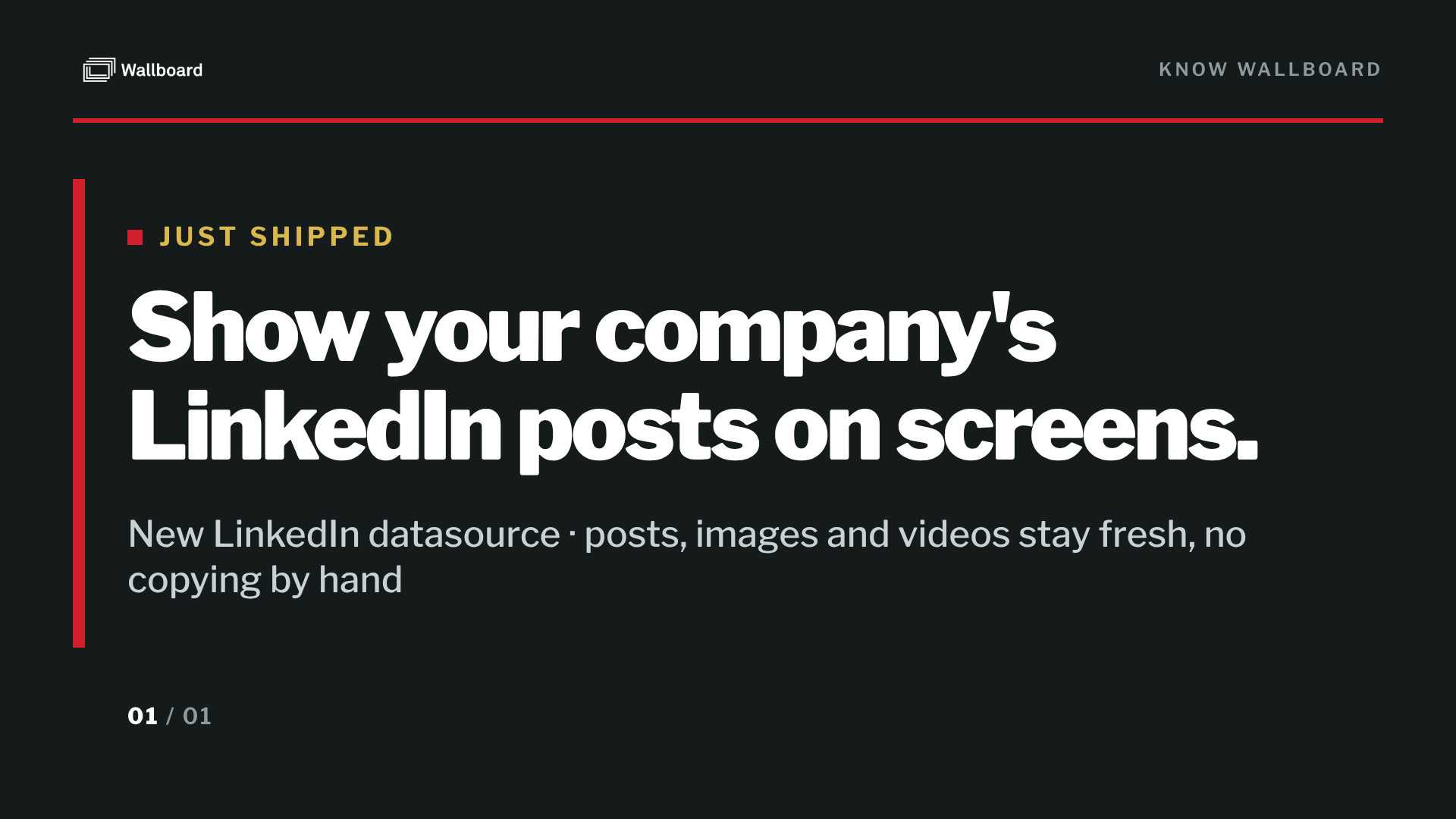
The source, in our "What’s new?" chat in Teams: "Show your company’s LinkedIn posts on screens. The new LinkedIn datasource pulls the latest posts from your company’s LinkedIn Page into Wallboard…"
My two minutes a morning
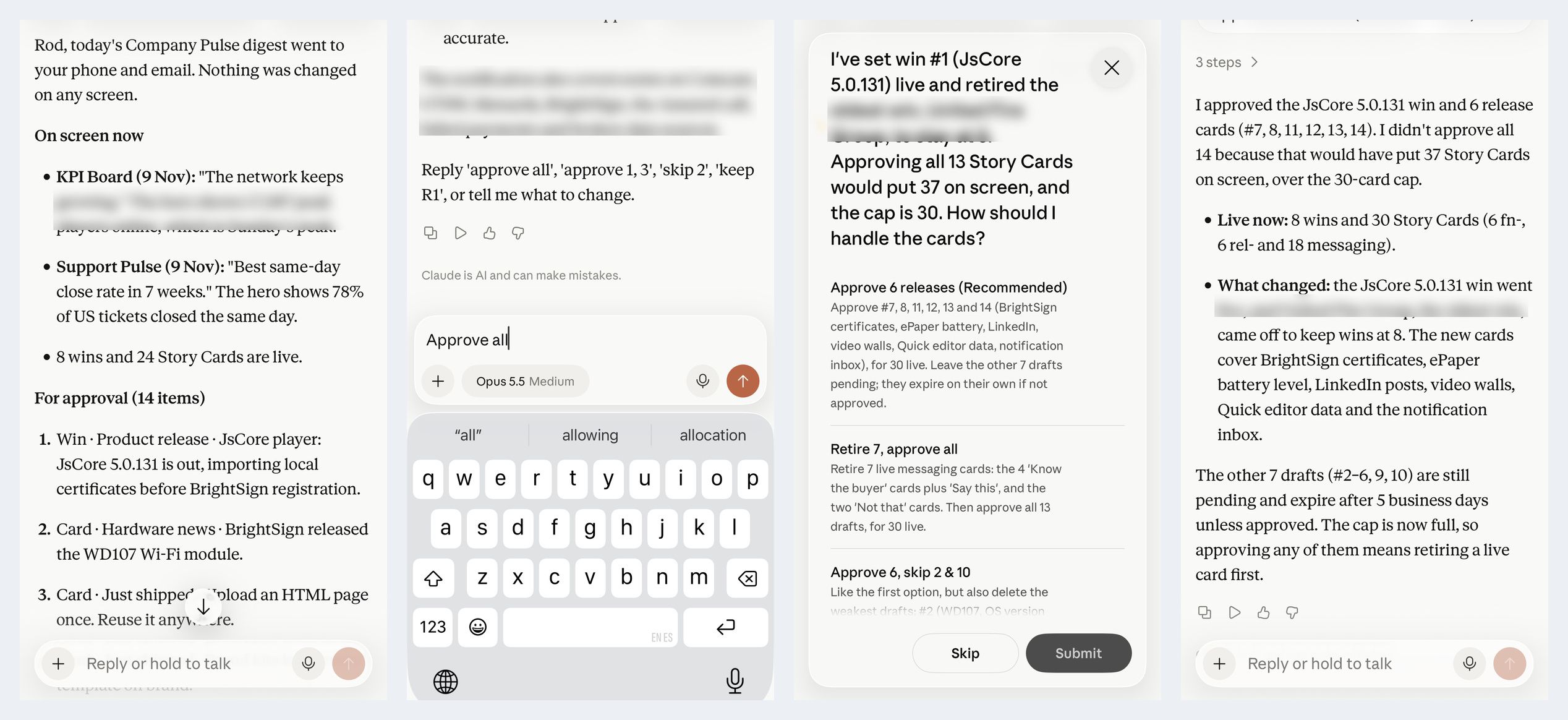
At 7:08 I get a single message. It shows what’s on screen, then a numbered list of drafts waiting for approval: wins, quotes from calls, new releases and fresh messaging cards. After that come any cards proposed for retirement, then a short "for you only" section. That last section holds what should never go on a wall, such as a frustrated customer or a deal size someone mentioned on a call.
I reply "approve all," or "approve 1, 3, skip 2," and the screen updates by itself. Drafts I ignore expire after a week.
On the first real Monday, the agents had queued 14 drafts. I typed "approve all." The digest didn’t just obey: approving everything would have put 37 cards on a screen built for 30. So it stopped and asked me how to handle it, with a recommendation. I picked the six release cards, and a minute later it confirmed exactly what went live and what came off. That’s what I mean by staying in the loop by choice. The agents do the work, follow the rules, and check with me when a rule and an instruction collide.
By the numbers
Days from first prompt to a self-running channel
9
Times I uploaded something to the portal
3 apps, 3 slides
Custom apps built
3
Slides in the loop
6 pages, about 3 minutes
Different screens in rotation, from 4 apps
46: 30 story cards, 8 wins, 4 data slides, 4 clock themes
Time before the screen repeats itself
about half an hour
AI agents running each weekday
5, plus the morning digest
Sources feeding the screen
Notion, HubSpot, Fireflies, Teams
My time each morning
about 2 minutes
Just the start
This is one screen in one office, and I have a long list of ideas: more sources, content by time of day, and eventually every Wallboard office. But the exciting part is already done. Earlier this year I bet that the value wouldn’t come from having an MCP connection. Plenty of tools can now take a command like "put this on screen 4." The value comes from what sits behind the connection. Ours reaches the whole platform: custom apps, live data tables, playlists inside playlists, the full API and the documentation. With that, the agents didn’t just operate our signage. They built a working system, and then they kept running it. Now I’ve seen it work in our own office, with a human in the loop because he wants to be.
The surprise was what it did for me. I’ve had access to all of this information all year, on a dashboard somewhere or in a daily email. But with so much data in so many places, the details got overlooked or lost. Now the company’s news comes to me on a screen I walk past all day, and I take it in without trying. For the first time in a long time, the news of our own company is actually registering. That’s the real power of digital signage as an internal communications tool, and I had to build it myself to feel it.
Frequently asked questions
What is the Wallboard MCP connector? It lets an AI assistant such as Claude work inside a Wallboard account. Through it, the AI can search the documentation, create datasources, build playlists, manage apps and check what is playing on a screen, using the same API Wallboard’s own engineers use.
Can AI agents really run a digital signage network? In this case, yes. After a nine-day build, five agents refresh the office screens every weekday before 7 a.m. Numbers publish automatically with sanity checks, and new stories wait for a person to approve them.
Do you need design or coding skills? No. The author isn’t a designer and logged into the Wallboard portal only a handful of times. His part was describing what he wanted, uploading three app files and approving content.
Which Wallboard features does it use? Custom apps, internal table datasources, data binding, brand settings, nested playlists, device commands and player screenshot history. These are standard features any Wallboard customer has. The full list is in the appendix below.
How much human time does it take? About two minutes each weekday morning: reading one digest message and replying "approve."
How do you keep AI from putting the wrong thing on screen? Words and stories need approval before they appear. Numbers have automatic checks: nothing negative goes on screen, and the board holds if the main number jumps more than 25%. Anything sensitive, such as a frustrated customer or a deal size, goes to a private "for you only" section of the digest and never to the wall.
For the technically curious: the Wallboard features doing the work
Nothing here is a special build for us. Company Pulse runs entirely on features any Wallboard customer has.
| Wallboard feature | What it does in Company Pulse |
|---|---|
| Custom apps | Claude built three apps (KPI Board, Spotlight, Story Card) from Wallboard’s public app toolkit. I uploaded them in Settings > Apps. |
| Internal table datasources | Six tables hold everything on screen: KPIs, wins, story cards, and three sets of support numbers. The agents write rows and the apps display them. |
| Data binding | One app, many slides. The KPI Board app powers four slides, each bound to a different table. |
| Brand settings | Colors, fonts and the logo came from our own Wallboard branding, so every app is on brand by default. |
| Slide copies through the API | The support slides and the four World Clock themes were made by copying existing slides through the API, without opening the editor. |
| Playlists | One Company Pulse playlist, with a set time for each page, assigned to the office player. |
| Nested playlists with balanced rotation | A playlist inside the playlist shows one World Clock theme or one support slide per loop, so the screen changes without getting longer. |
| Device commands | Refresh content, restart the player, and turn on rapid preview while testing. |
| Player screenshot history | Screenshots the player takes of itself. This is how Claude checks its own work on the real screen. |
| MCP connector tools | Purpose-built tools for datasources and playlists, the full API, and documentation search. Every change above went through them. |
There’s room to grow: scheduling by time of day, channels for more screens and offices, and proof-of-play reports are all built into the platform and not yet used.